使用指南Setup guide
三步连上:下载、导入、开启Three steps: install, add your link, switch on
大约 3 分钟。先选你的设备,照着图一步一步做。About 3 minutes. Pick your device and follow the pictures.
开始之前Before you start
-
你的订阅链接:购买后由客服发给你,也可以登录“我的账户”页面复制。样子像下面这样。请当作密码保管,不要转发给别人。
Your subscription link: sent to you by support after you buy, and also shown in your account page. It looks like the line below. Treat it like a password and do not share it.
https://sub.ridoyvpn.com/sub/xxxxxxxxxxxxxxxx - 一次只用一个 VPN:开始前请先关闭其他 VPN 或代理软件,包括 OpenVPN,否则会互相抢占网络。 One VPN at a time: switch off any other VPN or proxy app first, OpenVPN included, or they will fight over the network.
-
下载并安装 Clash VergeDownload and install Clash Verge
双击下载的文件,一路点“下一步”。如果 Windows 提示“未知发布者”,点“更多信息 → 仍要运行”。这是开源软件,没有商业代码签名,不是病毒。 Open the file and keep clicking Next. If Windows warns about an unknown publisher, choose More info → Run anyway. The app is open source and not commercially code-signed.
ARM 版 Windows(少见)请到 下载列表 查看说明。On an ARM Windows PC (uncommon) see the download list.
-
导入订阅链接Add your link
打开 Clash Verge,点左边的 Profiles(配置)。把你的订阅链接粘贴到最上面的输入框(①),点 IMPORT(导入)(②)。导入后会出现名为 Ridoy VPN 的配置,点一下它,让它变成选中(蓝色)。 Open Clash Verge and click Profiles on the left. Paste your link into the box at the top (1) and click IMPORT (2). A profile named Ridoy VPN appears; click it once so it turns blue (selected).

-
选择节点Choose a node
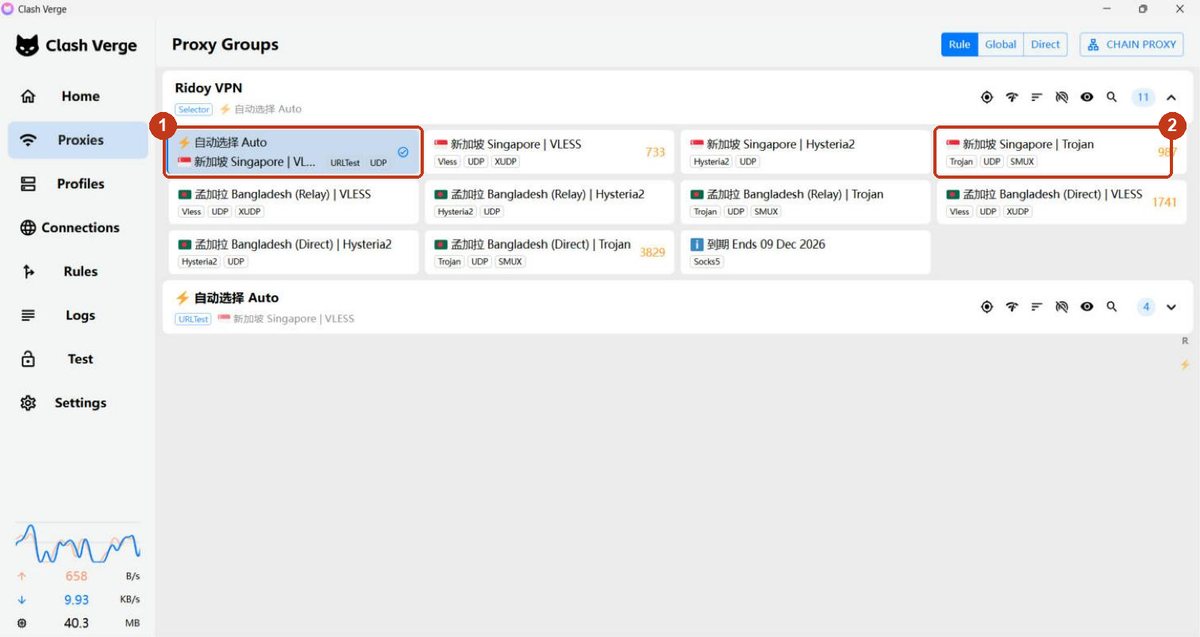
点左边的 Proxies(代理),右上角模式选 Rule(规则)。直接用默认的 ⚡ 自动选择 Auto(①)就行,它会自动选最快的线路。想手动选,推荐 🇸🇬 新加坡 Singapore | Trojan(②)。 Click Proxies on the left and set the mode at the top right to Rule. The default ⚡ Auto (1) is fine: it picks the fastest route for you. To choose by hand, we recommend 🇸🇬 Singapore | Trojan (2).
-
打开系统代理Switch on System Proxy
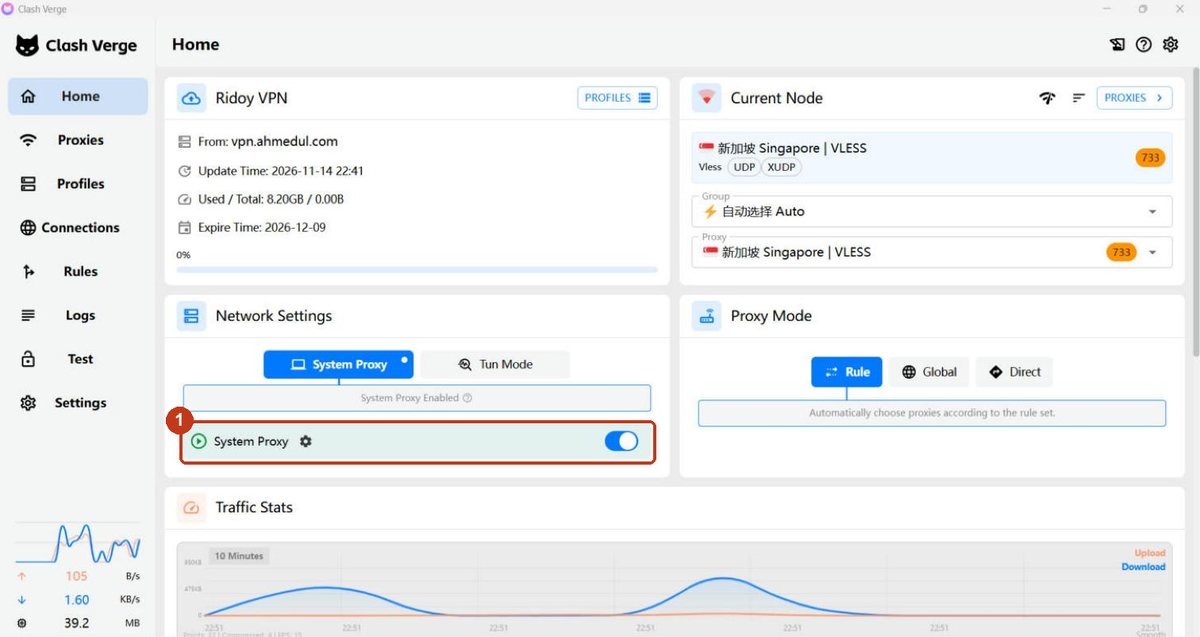
回到 Home(首页),把 System Proxy(系统代理) 的开关打开(①)。浏览器和大多数软件会自动走 VPN。不用时把它关掉就行。 Go back to Home and turn on System Proxy (1). Browsers and most apps will use the VPN automatically. Turn it off when you are done.
-
试一试Try it
在浏览器打开 google.com、youtube.com 或 chatgpt.com。能打开就成功了。 Open google.com, youtube.com or chatgpt.com in your browser. If they load, you are done.
-
下载并安装 Clash VergeDownload and install Clash Verge
Apple 芯片 (M1 / M2 / M3 / M4)Apple silicon (M1 / M2 / M3 / M4) 77 MB备用backup Intel 芯片Intel 83 MB备用backup不确定?点左上角 苹果菜单 → “关于本机”,看“芯片”一栏。Not sure? Apple menu → About This Mac, look at the Chip line.
打开下载的 .dmg,把 Clash Verge 拖进“应用程序”。第一次打开时如果提示无法验证开发者,到 系统设置 → 隐私与安全性,点“仍要打开”。 Open the .dmg and drag Clash Verge into Applications. If macOS says it cannot verify the developer the first time, go to System Settings → Privacy & Security and click Open Anyway.
-
导入订阅链接Add your link
界面和 Windows 完全一样(下图为 Windows 截图)。点 Profiles,粘贴订阅链接(①),点 IMPORT(②),再点一下 Ridoy VPN 让它变蓝。 The app looks the same as on Windows (pictures are from Windows). Click Profiles, paste your link (1), click IMPORT (2), then click Ridoy VPN so it turns blue.
-
选择节点Choose a node
Proxies 页面,模式选 Rule,用默认的 ⚡ 自动选择 Auto(①)。想手动选,推荐 🇸🇬 新加坡 Singapore | Trojan(②)。 On Proxies, set the mode to Rule and keep the default ⚡ Auto (1). To choose by hand we recommend 🇸🇬 Singapore | Trojan (2).
-
打开系统代理Switch on System Proxy
在 Home 页打开 System Proxy(①)。Mac 可能会要你输入开机密码来修改网络设置,输入后即可。 On Home, turn on System Proxy (1). The Mac may ask for your login password to change network settings; enter it to continue.
-
试一试Try it
在浏览器打开 google.com、youtube.com 或 chatgpt.com。能打开就成功了。 Open google.com, youtube.com or chatgpt.com in your browser. If they load, you are done.
-
下载并安装 FlClashDownload and install FlClash
下载 Android 版Download for Android 58 MB · 64-bit备用backup 旧手机 (32 位)Older phones (32-bit) 58 MB备用backup大多数手机选第一个。下载后点击文件安装;如果提示“不允许安装未知来源应用”,按提示打开“允许此来源”再安装即可。 Most phones need the first one. Open the downloaded file to install it. If Android says installing from this source is not allowed, tap Settings and allow it, then install again.
-
第一次打开:同意免责声明First launch: accept the disclaimer
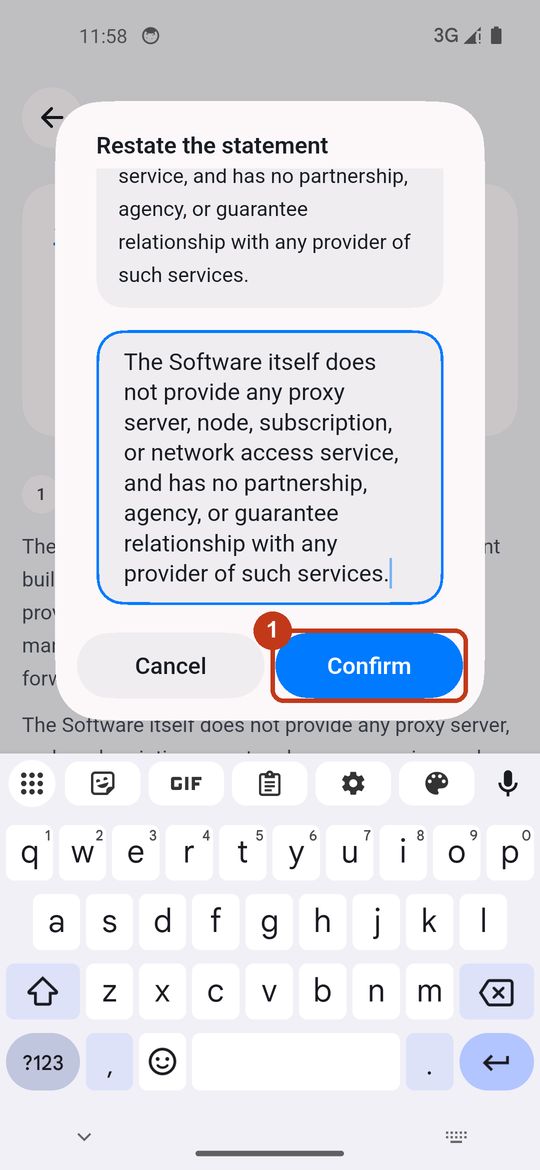
FlClash 第一次打开会显示免责声明,点 Agree(同意)(①)。接着会弹出一个框,要求你把框里那句英文原样输入一遍,输入后 Confirm 才能点(①)。这是软件自己的要求,只需做一次。 The first time FlClash shows a disclaimer; tap Agree (1). A box then asks you to type the English sentence shown in it, exactly; once you have, Confirm turns on (1). This is the app's own rule and you only do it once.
不想手打?长按下面这句话复制,再粘贴到输入框:Do not want to type it? Long-press the sentence below to copy it, then paste it into the box:
The Software itself does not provide any proxy server, node, subscription, or network access service, and has no partnership, agency, or guarantee relationship with any provider of such services.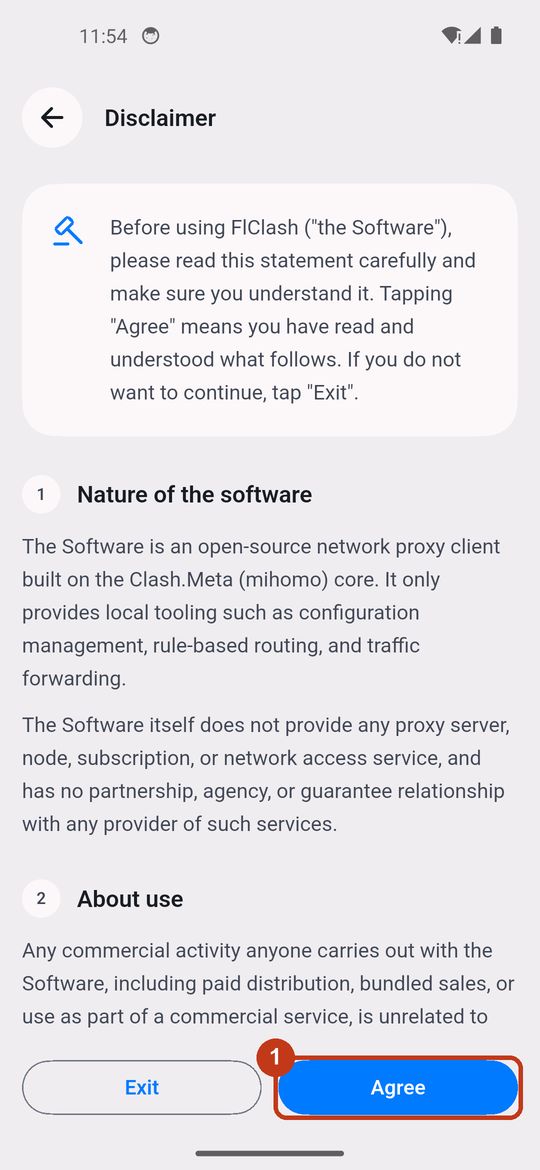
-
导入订阅链接Add your link
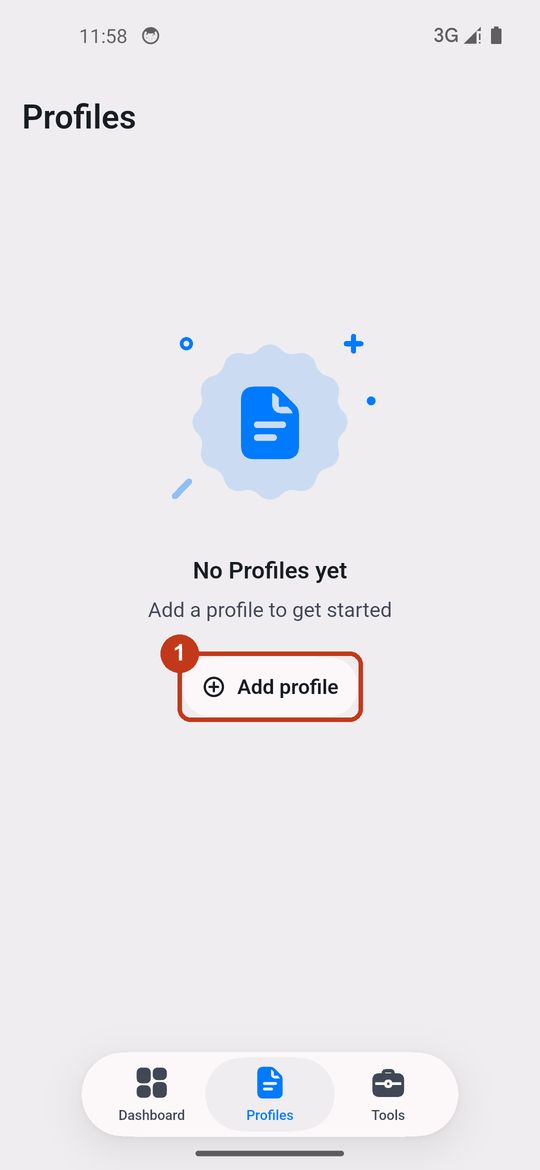
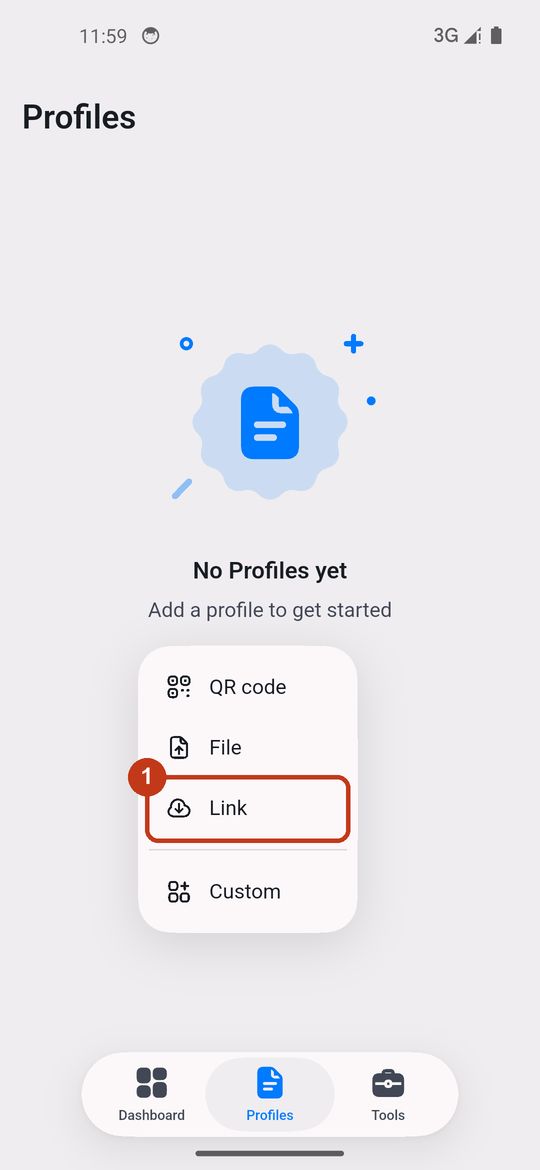
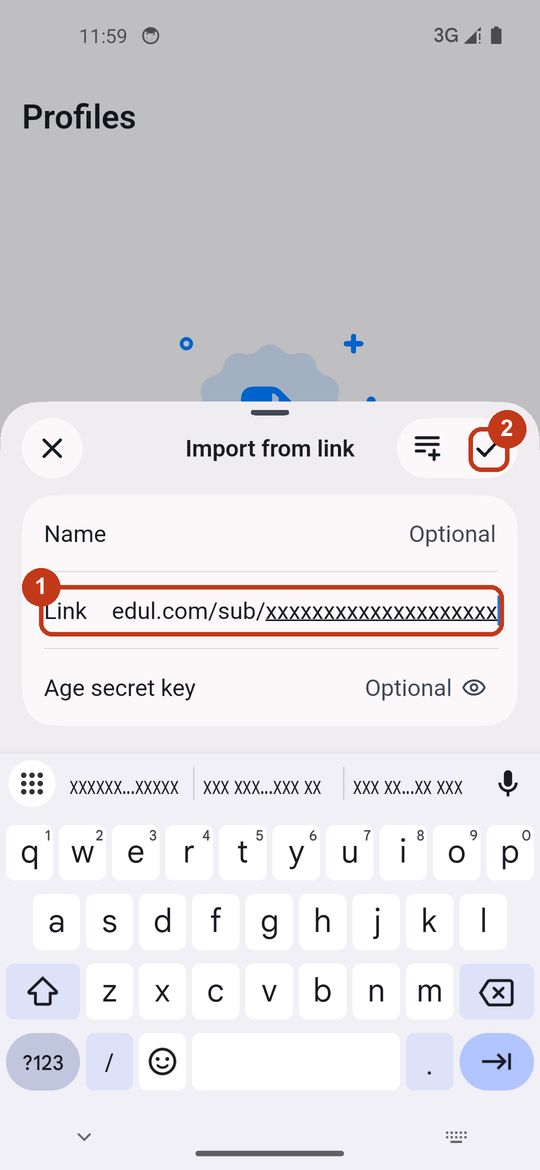
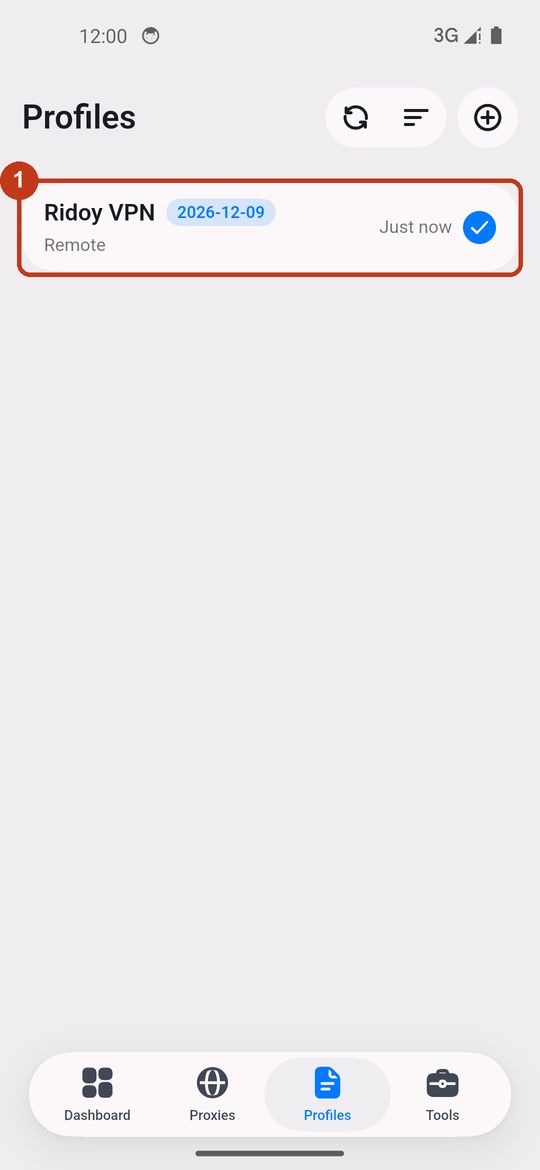
先复制你的订阅链接。进入底部的 Profiles,点 Add profile(①),选 Link(②),把链接粘贴到 Link 栏,点右上角的 ✔(③)。几秒后会出现 Ridoy VPN 和到期日,并且已经选中。 Copy your link first. Go to Profiles at the bottom, tap Add profile (1), choose Link (2), paste the link into the Link field and tap the ✔ at the top right (3). After a few seconds Ridoy VPN appears with its end date, already selected.
-
选择节点Choose a node
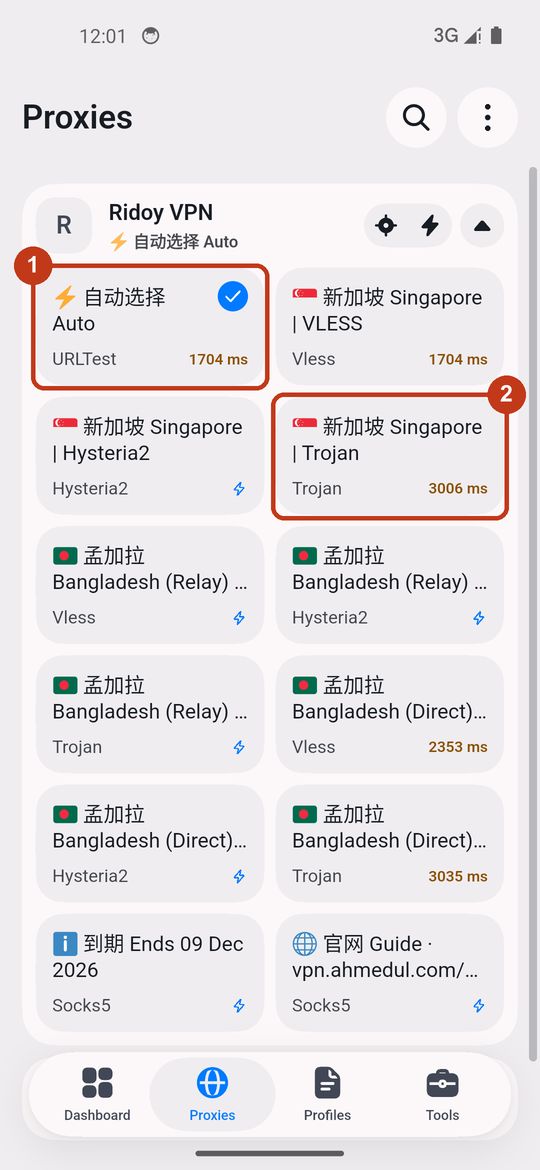
进入底部的 Proxies,点 Ridoy VPN 展开。保持默认的 ⚡ 自动选择 Auto(①)就可以,它会自动选最快的线路。想手动选,推荐 🇸🇬 新加坡 Singapore | Trojan(②)。 Open Proxies at the bottom and tap Ridoy VPN to expand it. Keep the default ⚡ Auto (1): it picks the fastest route. To choose by hand we recommend 🇸🇬 Singapore | Trojan (2).
-
开启连接Switch on
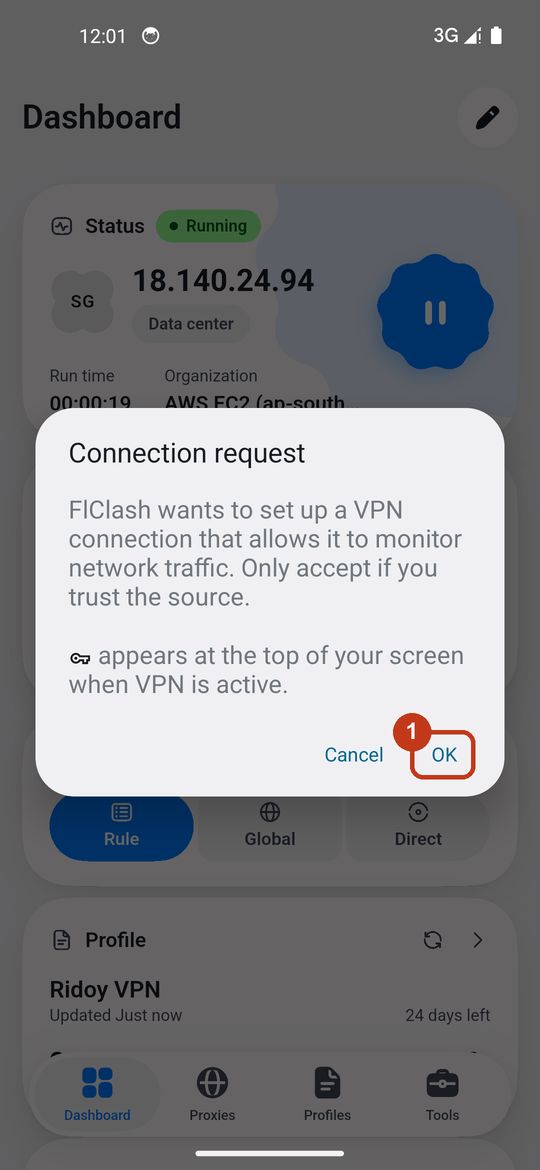
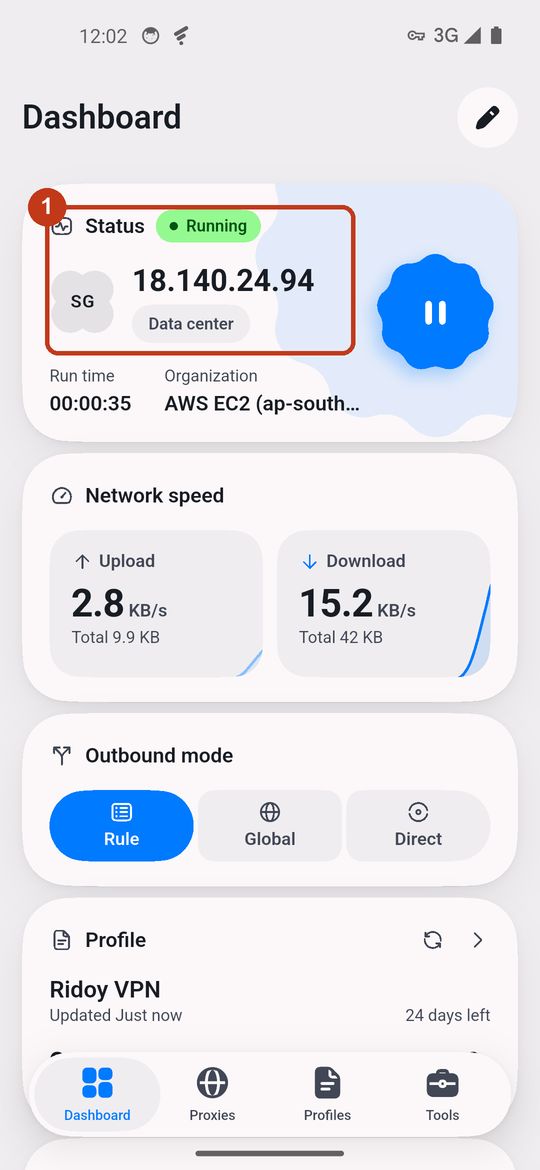
回到 Dashboard,点右上方那个大的圆形 ▶ 按钮。第一次会问是否允许通知,点 Allow;接着出现“连接请求(Connection request)”,点 OK(①)。状态变成绿色的 Running,手机顶部出现钥匙图标,就表示已连接(②)。 Go back to Dashboard and tap the big round ▶ button at the top right. The first time it asks about notifications; tap Allow. Then a Connection request appears; tap OK (1). When the status turns green Running and a key icon shows at the top of the phone, you are connected (2).
-
试一试Try it
用手机浏览器打开 google.com、youtube.com 或 chatgpt.com。能打开就成功了。不用时,回到 Dashboard 点 暂停(⏸) 即可关闭。 Open google.com, youtube.com or chatgpt.com in your phone browser. If they load, you are done. To stop, go back to Dashboard and tap pause (⏸).
-
从 App Store 安装 Clash Plus(免费)Install Clash Plus from the App Store (free)
这个应用在 App Store 的 非中国大陆地区 才能下载,需要用海外地区的 Apple ID 登录。iPhone 不能直接下载安装包,只能通过 App Store 安装。 The app is only available in non-mainland-China App Store regions, so sign in with an Apple ID from another region. iOS cannot install app files directly; the App Store is the only way.
其他可用的应用(本页只提供下载链接,不含图文教程):Other apps that work (download links only, no walkthrough here): Stash (付费)(paid) · Shadowrocket (付费)(paid) · Hiddify (免费)(free)
-
添加配置Add a profile
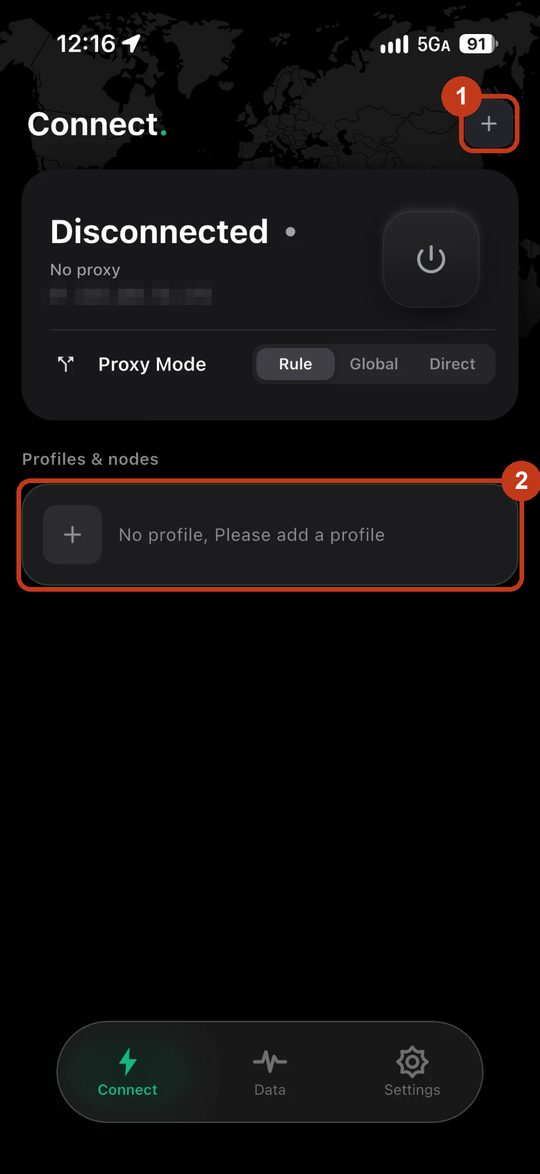
打开 Clash Plus,在 Connect 页点右上角的 +,或者点下面的“No profile, Please add a profile”(①②)。 Open Clash Plus. On the Connect page tap the + at the top right, or the “No profile, Please add a profile” bar (1, 2).
-
导入订阅链接Import your link
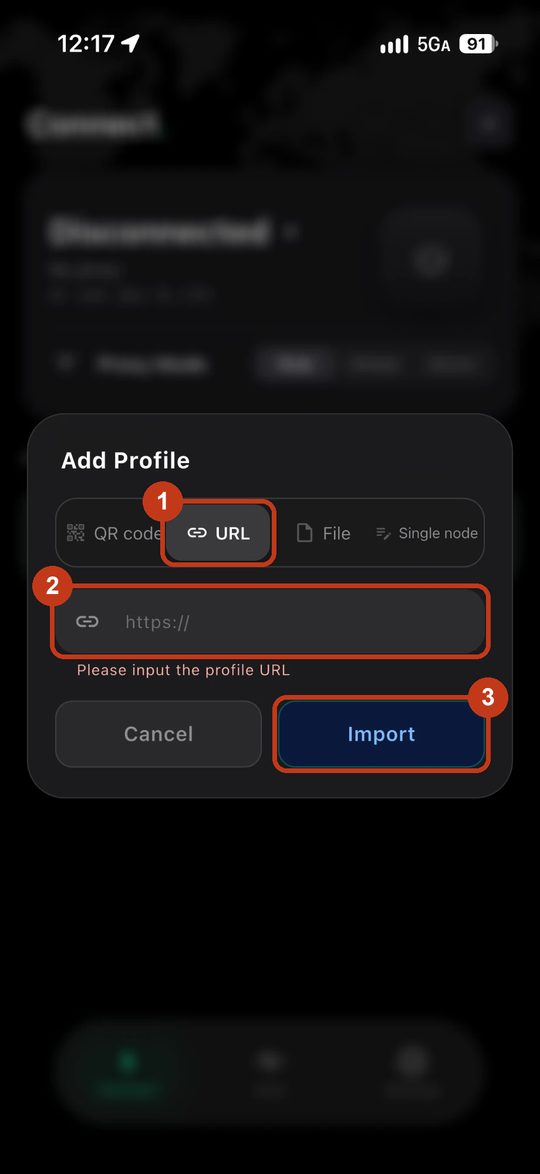
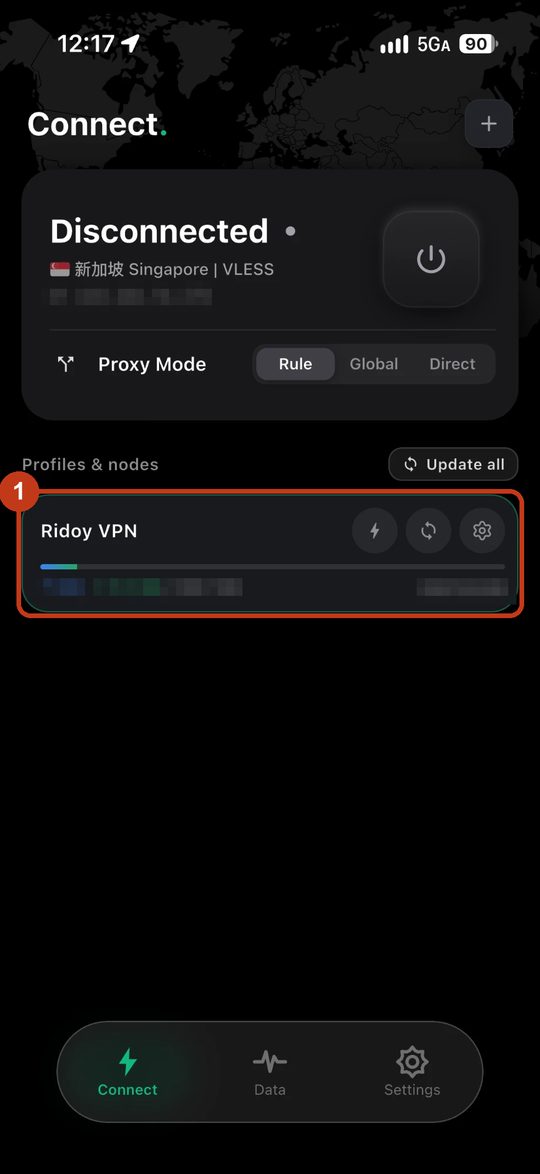
先复制你的订阅链接。在 Add Profile 窗口选 URL 这一项(①,不要选 QR code),把链接粘贴到输入框(②),点 Import(③)。几秒后会出现 Ridoy VPN 这一栏(第二张图的①)。 Copy your link first. In the Add Profile window pick URL (1, not QR code), paste the link into the box (2) and tap Import (3). After a few seconds a Ridoy VPN card appears (1, second picture).
-
选择线路Choose a route
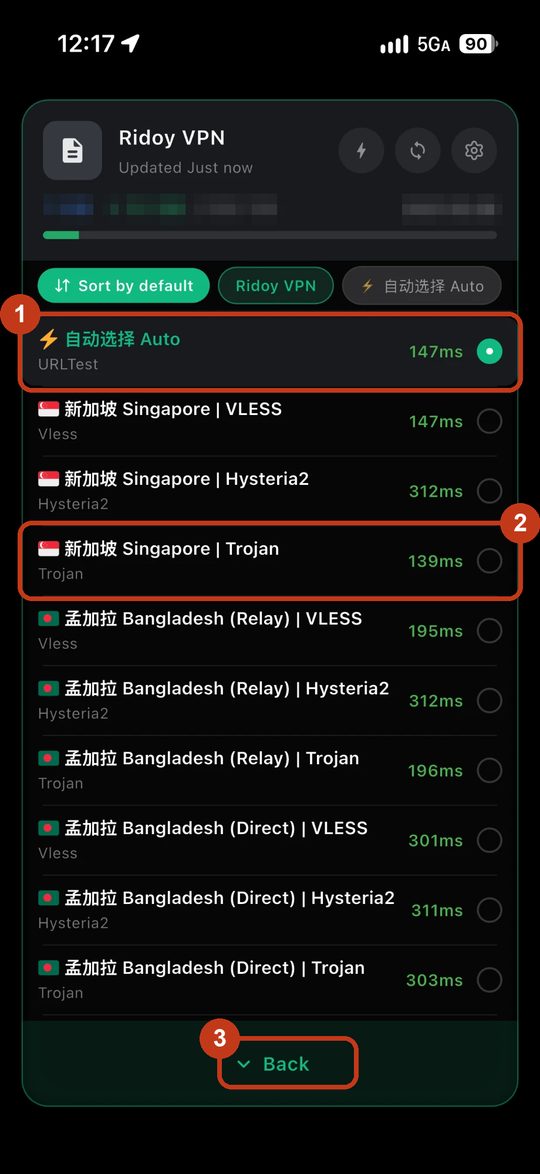
点一下 Ridoy VPN 这一栏,会打开线路列表。保持默认的 ⚡ 自动选择 Auto(①)就可以,它会自动选最快的线路;右边的 ms 数字越小越快。想手动选,推荐 🇸🇬 新加坡 Singapore | Trojan(②)。选好后点下面的 Back(③)。 Tap the Ridoy VPN card to open the route list. Keep the default ⚡ Auto (1): it picks the fastest route; the smaller the ms number the faster. To choose by hand we recommend 🇸🇬 Singapore | Trojan (2). Then tap Back (3).
-
开启连接Switch on
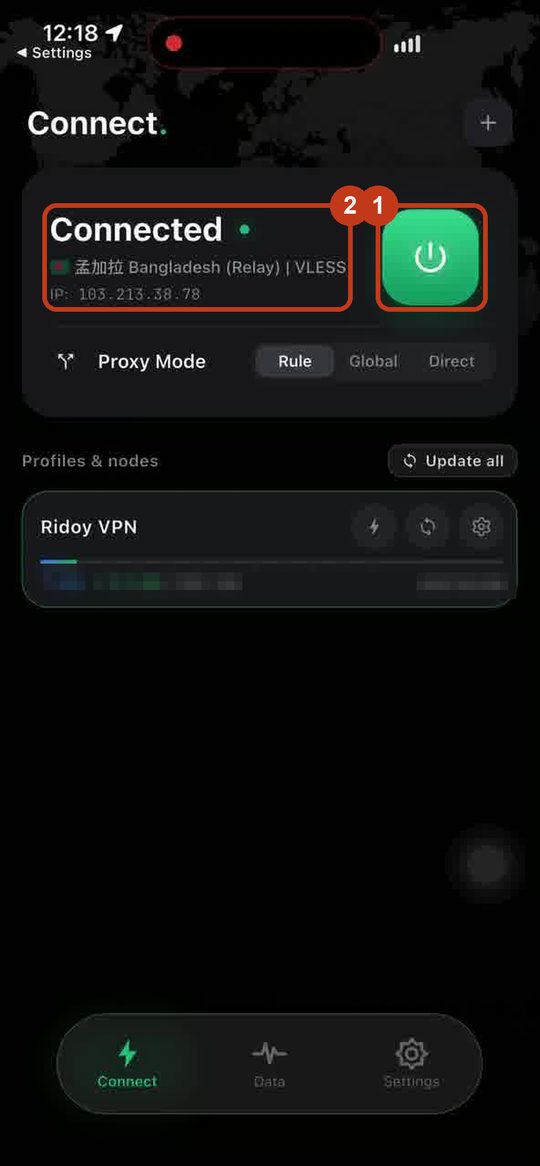
回到 Connect 页,点右边的大电源按钮(①)。第一次 iPhone 会提示“添加 VPN 配置”,点 允许,输入锁屏密码。显示绿色的 Connected(②),状态栏出现 VPN 图标,就表示已连接。图中显示的是孟加拉 Relay 线路,你的会显示你选的线路。 Back on the Connect page tap the big power button on the right (1). The first time the iPhone asks to add a VPN configuration; tap Allow and enter your passcode. When it shows a green Connected (2) and a VPN icon appears in the status bar, you are connected. The picture shows the Bangladesh Relay route; yours shows the route you chose.
-
试一试Try it
用 Safari 打开 google.com、youtube.com 或 chatgpt.com。能打开就成功了。不用时,回到 Connect 页再点一下电源按钮即可关闭。 Open google.com, youtube.com or chatgpt.com in Safari. If they load, you are done. To stop, go back to the Connect page and tap the power button again.
该选哪条线路?Which route should I pick?
| 线路Route | 适合Good for | 上网 IPYour IP appears as |
|---|---|---|
| ⚡ 自动选择 Auto | 不想操心:自动选最快的线路(推荐)Just works: picks the fastest route (recommended) | — |
| 🇸🇬 新加坡 Singapore | 最快。Claude、ChatGPT、YouTube、Google 都适合Fastest. Best for Claude, ChatGPT, YouTube, Google | 新加坡Singapore |
| 🇧🇩 孟加拉 Bangladesh (Relay) | 需要孟加拉国 IP,但仍走新加坡中转,速度较快You need a Bangladesh IP; routed through Singapore so it stays fast | 孟加拉国Bangladesh |
| 🇧🇩 孟加拉 Bangladesh (Direct) | 备用线路,速度最慢Backup route, the slowest | 孟加拉国Bangladesh |
每条线路后面的 Trojan / VLESS / Hysteria2 是传输方式。推荐 Trojan,最稳;VLESS 也可以;Hysteria2 在 Wi-Fi 很好时才建议试,手机流量下可能不稳。 The Trojan / VLESS / Hysteria2 at the end of each name is the transport. Trojan is recommended and the most stable; VLESS is fine; try Hysteria2 only on good Wi-Fi, it can be unstable on mobile data.
小提示Good to know
- 到期和流量:列表最后一行“ℹ 到期 Ends …”显示到期日。到期前请联系客服续费,到期后线路会停用,应用里会显示提示。Expiry: the last line of the list, “ℹ Ends …”, shows your end date. Renew with support before then; after it the routes stop and the app shows a notice.
- 更新配置:客服通知有新线路时,在应用里点配置旁边的“刷新”按钮即可。Updating: when support tells you about new routes, press the refresh button next to your profile in the app.
- Chrome 看 YouTube 卡:在地址栏输入
chrome://flags/#enable-quic,把它设为 Disabled,重启浏览器。YouTube stutters in Chrome: openchrome://flags/#enable-quic, set it to Disabled, restart the browser. - 国内网站会自动直连,不会变慢;只有国外网站才走 VPN。Chinese sites connect directly and stay fast; only foreign sites go through the VPN.
打不开怎么办?Not working?
- 导入失败:检查链接是否完整、前后没有空格,并且是 https:// 开头。Import fails: check the link is complete, has no spaces and starts with https://.
- 连上了但打不开网页:换一条线路再试,优先 🇸🇬 新加坡 | Trojan;确认模式是 Rule,并且没有同时开着别的 VPN。Connected but pages will not load: try another route, 🇸🇬 Singapore | Trojan first; make sure the mode is Rule and no other VPN is running.
- 全部超时:检查电脑或手机的日期和时间是否正确(时间错了会连不上),然后点配置旁的刷新。Everything times out: check that your date and time are correct (a wrong clock breaks the connection), then refresh the profile.
- 应用里只显示一条提示:说明账号已到期、暂停或流量用完,请联系客服。The app shows only one notice entry: the account has expired, is paused or is out of data. Contact support.
全部下载All downloads
下面的安装包均为官方原版,未做任何修改,放在我们自己的服务器上,方便国内高速下载。第一个链接下载不动时,请用“备用”链接。SHA-256 可用来核对文件是否完整。 These are the official, unmodified installers, mirrored on our own servers for faster downloads in China. If the first link is slow, use the backup link. The SHA-256 lets you check a file is intact.
| 设备Device | 文件File | 大小Size | SHA-256 |
|---|---|---|---|
| Windows | Clash.Verge_2.5.10_x64-setup.exe · 备用backup | 57 MB | 929da9303b643b80ce309ab29f618e37a5562f515d1fa55ebf5b86c822504450 |
| Mac (Apple) | Clash.Verge_2.5.10_aarch64.dmg · 备用backup | 77 MB | 40d4a7da4543d75f573a5cfcc31543b0b4bf7e02caa122a9ca50654859585839 |
| Mac (Intel) | Clash.Verge_2.5.10_x64.dmg · 备用backup | 83 MB | b1d6938680f3e411b5961e56591faaa92c95e9676f54ebfdfa98b7eab374023e |
| Android 64-bit | FlClash-0.9.3-android-arm64-v8a.apk · 备用backup | 58 MB | 700570428bde3a1b316ae7f7e8f10d77f9e23ee8bf8b3f45557362a061fbefb3 |
| Android 32-bit | FlClash-0.9.3-android-armeabi-v7a.apk · 备用backup | 58 MB | 9d3b19911efdfef303a33229a4caefedfc58d99992d7d23d373d549c36451645 |
| iPhone / iPad | Stash · Clash Plus · Shadowrocket · Hiddify | App Store | — |
应用来源:Clash Verge Rev 2.5.10(GPL-3.0,源码与其他版本);FlClash 0.9.3(GPL-3.0,源码与其他版本)。Windows ARM 版和其他系统请从上面的链接下载。 Apps: Clash Verge Rev 2.5.10 (GPL-3.0, source and other builds); FlClash 0.9.3 (GPL-3.0, source and other builds). For Windows on ARM or other systems use the links above.